When someone meets a sales executive, marketing representative or business development manager, the first thing they usually exchange is contact information.
Name.
Phone number.
Email address.
Company.
Designation.
Website.
Sometimes it is a business card.
Sometimes it is a WhatsApp message.
Sometimes the contact details are typed manually into a phone.
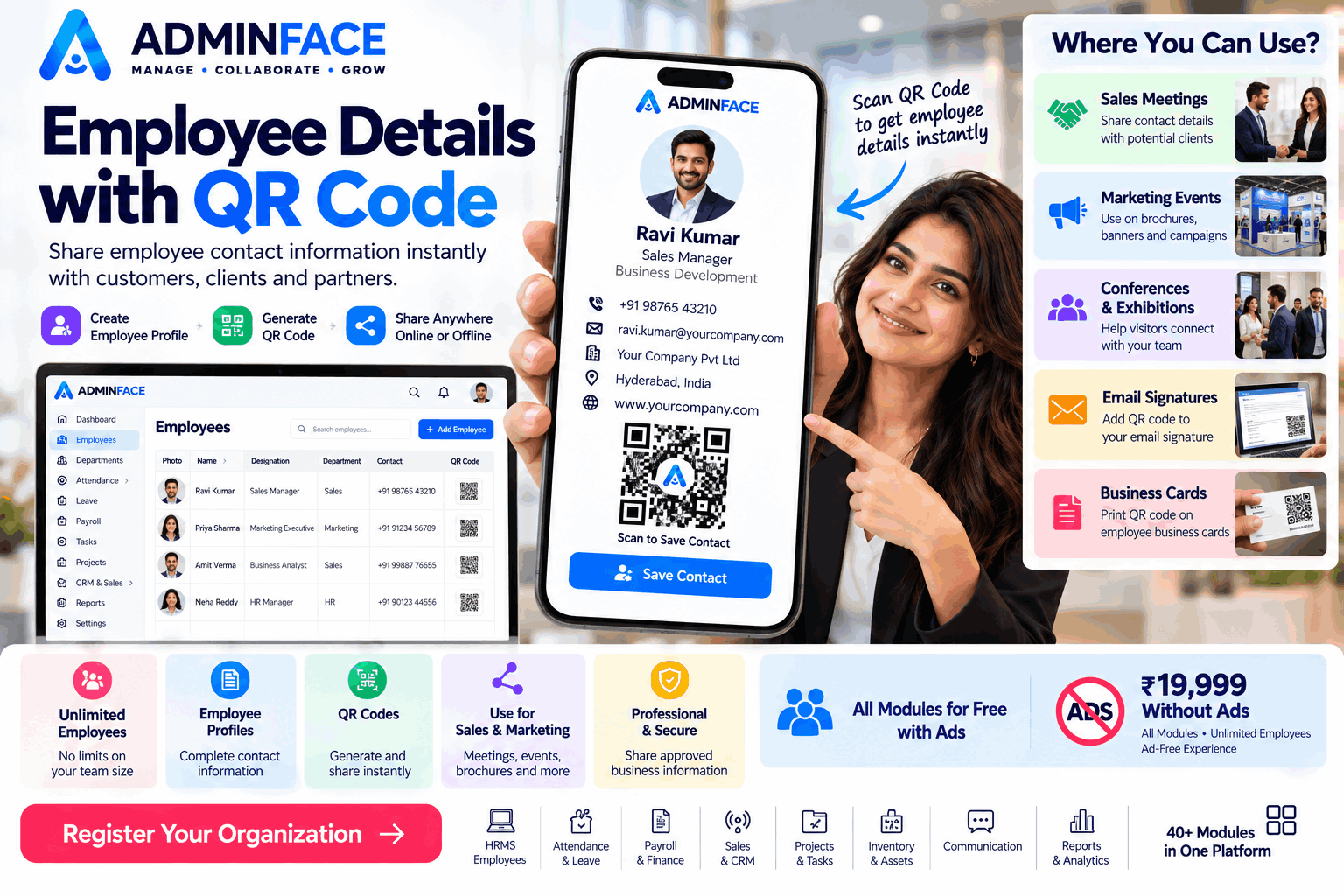
There is a simpler approach: a digital employee profile that can be shared through a QR code.
Instead of asking someone to manually enter contact information, they can scan a QR code and access the relevant employee details digitally.
This can be especially useful for sales, marketing, customer-facing employees and business development teams.
What Is a Digital Employee Profile?
A digital employee profile is an online page containing relevant information about an employee.
Depending on how your organization configures the profile, it can include information such as:
- Employee name
- Designation
- Department
- Company name
- Business email
- Contact number
- Company website
- Profile information
- Business-related contact details
The profile can be accessed through a unique URL.
For example:
https://your-company.adminface.com/employee/...
Note: The exact URL structure depends on the AdminFace implementation and configuration.
Why Add a QR Code?
Imagine a sales executive attending a business meeting.
Instead of saying:
"Let me send you my number."
They can simply show a QR code.
The other person scans it.
The employee's digital contact information opens.
That's it.
No typing.
No searching through WhatsApp conversations.
No paper business card.
How Sales Teams Can Use Employee QR Codes
Sales teams meet potential customers every day.
A QR-enabled employee profile can be useful at:
Business Meetings
Show the QR code at the end of a meeting so the customer can quickly access the representative's contact information.
Conferences
Print the QR code on a badge, booth display or marketing material.
Exhibitions
Visitors can scan the QR code instead of collecting multiple business cards.
Product Demonstrations
Sales representatives can display their profile after completing a product presentation.
Proposals
A QR code can potentially be included in sales documents or presentations where appropriate.
Email Signatures
A QR code can be added to an employee's email signature to provide another way for recipients to access contact information.
How Marketing Teams Can Use It
The same concept can be useful for marketing teams.
For example, a marketing employee could use a QR code on:
- Event banners
- Brochures
- Business cards
- Presentation slides
- Exhibition stands
- Printed advertisements
- Digital campaigns
- Company profiles
Someone interested in the company can scan the QR code and reach the relevant employee profile.
This creates a connection between offline marketing and digital information.
Replace the Traditional Business Card?
Not necessarily.
A QR-enabled digital profile can work alongside traditional business cards.
A printed business card can contain:
Employee Name
Designation
Company
Phone
QR Code
The QR code gives the recipient another way to access the employee's digital information.
One Employee. One Digital Profile.
For organizations with many employees, maintaining consistent employee information becomes important.
Instead of creating different formats for every employee, organizations can maintain employee information within their employee management system.
For example:
Employee Record
↓
Employee Profile
↓
Contact Information
↓
Digital Profile URL
↓
QR Code
This creates a simple connection between employee management and real-world business networking.
Unlimited Employees for Growing Organizations
Growing organizations don't stop hiring because they have reached a certain number of employees.
They may have:
- Sales teams
- Marketing teams
- HR teams
- Customer support
- Business development
- Consultants
- Branch employees
- Regional teams
- Management
A scalable employee management platform should therefore be able to support the organization's growth.
AdminFace provides employee management with support for unlimited employees under its applicable plans.
This allows organizations to maintain employee information as their teams grow.
Useful for More Than Sales
QR-enabled employee profiles aren't limited to sales representatives.
They can also be useful for:
Marketing
Share campaign or event contact information.
Business Development
Make it easier for prospects to save contact details.
Consultants
Share professional contact information during meetings.
Customer Support
Help customers identify the right contact person.
Management
Share executive or organizational contact information where appropriate.
HR
Maintain centralized employee information.
Example
Imagine a company attending a technology exhibition.
The sales team has 10 representatives.
Each representative has a digital employee profile.
At the exhibition:
Visitor → Scans QR Code → Employee Profile → Contact Information
The visitor doesn't need to type a phone number or email address manually.
The interaction becomes quick and professional.
QR Codes Can Make Offline Marketing More Interactive
QR codes are particularly useful because they connect physical materials with digital information.
A poster can contain a QR code.
A brochure can contain a QR code.
A business card can contain a QR code.
An exhibition badge can contain a QR code.
The visitor simply scans it using their phone.
This creates an easy bridge between physical marketing and digital information.
Employee Information Should Still Be Protected
A digital employee profile should not automatically mean that every piece of employee information becomes publicly available.
Organizations should carefully decide which information is appropriate to share.
For example, a public business profile may contain:
✅ Name
✅ Designation
✅ Company
✅ Business email
✅ Business phone
✅ Professional information
It should not expose sensitive internal employee information simply because a profile exists.
Access controls and privacy settings are important when implementing employee profiles.
How AdminFace Can Help
AdminFace brings employee management and other business operations into one platform.
Organizations can manage employee information along with other workflows such as:
- Employees
- Departments
- Teams
- Branches
- Attendance
- Leave
- Payroll
- Tasks
- Projects
- Documents
- Communication
- Reports
- Sales
- CRM
- And more
For sales and marketing teams, connecting employee information with digital contact sharing can create a more professional way to introduce team members.
From Employee Record to Business Connection
The idea is simple:
Employee Record
↓
Digital Employee Profile
↓
QR Code
↓
Customer Scans
↓
Contact Information
↓
Business Connection
This small improvement can make everyday networking easier for sales, marketing and customer-facing teams.
Frequently Asked Questions
What is an employee QR code?
An employee QR code can direct someone to a digital employee profile or contact page containing approved business information.
Can sales employees use QR codes?
Yes. QR codes can be useful for sales representatives when meeting customers, attending exhibitions or participating in business events.
Can marketing teams use employee QR codes?
Yes. Marketing teams can place QR codes on brochures, event materials, presentations and other promotional assets.
What employee information should be shared?
Only business information that the organization has decided is appropriate for sharing should be included. Sensitive or internal employee information should remain protected.
Can large companies use digital employee profiles?
Yes. Digital employee profiles can be useful for organizations with multiple departments, branches and customer-facing teams.